
The AriConsent cookie consent plugin is our free cookie banner for WordPress. This article explains what it does, how it handles Google Consent Mode v2, and where its limits are. We also cover what it does not do, so you can rule it out early if it is the wrong tool for your site.
What the AriConsent cookie consent plugin is and who it is for
AriConsent 0.4.0 is a cookie consent banner for WordPress. On its WordPress.org listing the price is 0.00 and it is described as having “No traffic limits”, so there are no page-view caps or visitor limits.
The plugin is new and has no reviews yet. The listing shows the current number of active installs. If you prefer tools with a long track record, take that into account.
The banner, the blocking and the consent log all run on your own site. According to the plugin description, it makes no requests to AriHub or any other outside server.
It fits small business and WordPress sites that use analytics, Google Ads, Microsoft Clarity or Microsoft Advertising, or embeds such as YouTube and Vimeo.
Look elsewhere if your site shows personalised ads through AdSense, Ad Manager or AdMob. The section on what AriConsent does not do explains why.
Security issues are reported through the Patchstack Vulnerability Disclosure Program, as listed on the plugin page. You can read more on the AriConsent product page.
What your visitors see
On the banner, “Accept all” and “Reject all” have the same colour, size and place. Refusing takes no more effort than accepting.
Visitors can reopen their settings and change their mind later in two ways, both described on the WordPress.org page:
- the
shortcode, placed on any page - any link pointing to
#cookie-settings, for example a “Cookie settings” item in your footer menu
Before you go live, try the banner using only your keyboard: tab to each button, open the settings and close them again. Check the WordPress.org page for the languages that ship with the plugin.
Practical tip: write a banner text that says what you use, why, and who receives the data. Nkom explains that under ekomloven § 3-15, users must be told which data is processed, for what purpose, and who processes it. For example: “We use Google Analytics to see which pages are read, and YouTube to show videos. Google receives data from both.”
How AriConsent blocks trackers and embeds
AriConsent holds back the trackers and embeds on its list until the visitor says yes. It also blocks trackers and embeds that other scripts add after the page loads until consent is given. This matters if your theme or plugins inject scripts late.
AriConsent works with page caching. The page is the same for every visitor, and the visitor’s choice is applied in the browser.
The important limit: it blocks what is on its list. If you use a niche tracker or a custom script, run the site scan and add anything missing. The health check flags problems such as a tracker that still loads before consent, so you can catch gaps without reading the page source.
Google Consent Mode v2, WP Consent API and Tag Manager
AriConsent sets all Google consent types to “denied” before any tag loads, then updates them after the visitor makes a choice. Google notes that consent mode does not provide a banner, so you need a banner to collect the choice and pass it on.
This matters if you advertise with Google. Google’s EU user consent policy says advertisers with EEA traffic who use Google tags must pass visitors’ consent choices to Google, through consent mode or TCF.
Basic or advanced: which to choose
Google describes two ways to implement consent mode in its consent mode overview:
| Basic | Advanced | |
|---|---|---|
| When Google tags load | Only after the visitor interacts with the banner | When the page loads |
| Data sent before consent | None, not even the default consent status | Cookieless pings while consent is denied, which feed Google’s modelling |
| In AriConsent | Default | Optional, you switch it on |
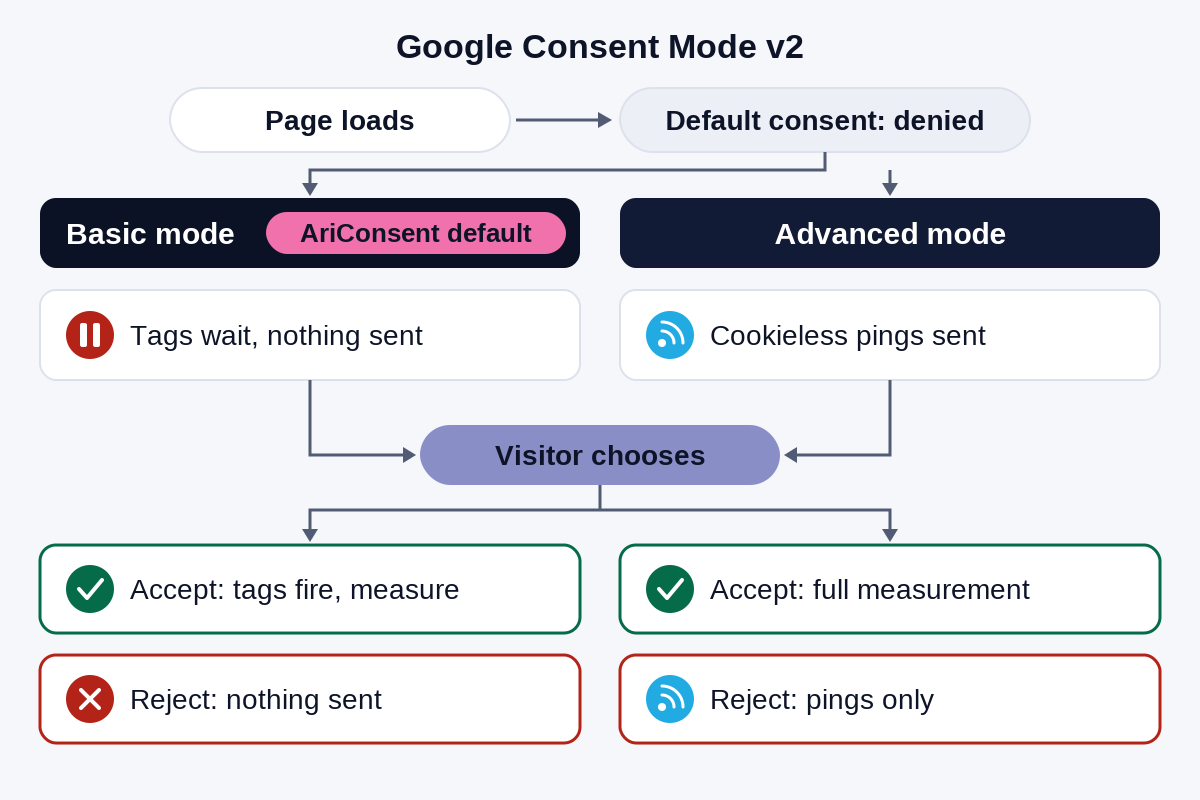
Basic is the cautious default. With advanced mode, some data reaches Google even when the visitor says no. Only switch it on after checking with your privacy adviser, and make sure your banner text and privacy policy reflect the choice.
In basic mode, visitors who reject are not measured, so expect fewer measured visitors in your reports. Our guide on measuring results with Google Analytics covers how to read your numbers when part of your traffic is not tracked.
Using AriConsent with Google Tag Manager
Because AriConsent sets the consent defaults to “denied” before any tag loads, this also applies to Google tags you load through Tag Manager. After setting it up, run the private-window test in the setup steps below to confirm that your tags wait for consent.
AriConsent also sends consent signals to Microsoft Clarity (Consent API v2) and Microsoft Advertising (UET consent mode). If you use those tools, the visitor’s choice is passed on to them as well.
Other plugins and the WP Consent API
The WP Consent API is a separate free plugin (version 2.1.0 at the time of writing). It gives plugins a standard way to share consent categories with each other. It does not handle consent itself and needs a cookie banner plugin.
Without a banner plugin active, the WP Consent API always returns consent as given. Do not install it on its own and assume you are covered.
With AriConsent and the WP Consent API installed, plugins that read consent through the API follow the visitor’s choice, and the cookies they register appear in your cookie declaration automatically. WooCommerce is one of these: with the WP Consent API installed, it waits for consent by itself.
Keeping records and keeping it up to date
AriConsent keeps a consent log in your own WordPress database. Each choice gets a consent ID, stored in the visitor’s ariconsent cookie, and the log does not store IP addresses. You can look up an ID under AriConsent → Consent log.
Google’s guidance on its EU user consent policy says consent records should include the text and choices shown, plus the date and time of consent. Check what your log records, and keep a dated copy of your banner texts each time you change them.
The health check appears on the AriConsent screen and in Tools → Site Health, with a health score from 0 to 100. Treat any flagged item as a task to fix.
When you add a new tracker or change what you use data for, ask every visitor again. You can do this from the command line with wp ariconsent reconsent.
The
shortcode lists only the services AriConsent has found on your site, with their cookies. Put it on your privacy or cookie policy page so the list stays in step with your site.
For freelancers and agencies, the WP-CLI commands are wp ariconsent status, scan, reconsent, export and import. Export and import let you copy settings between sites instead of setting up each banner by hand.
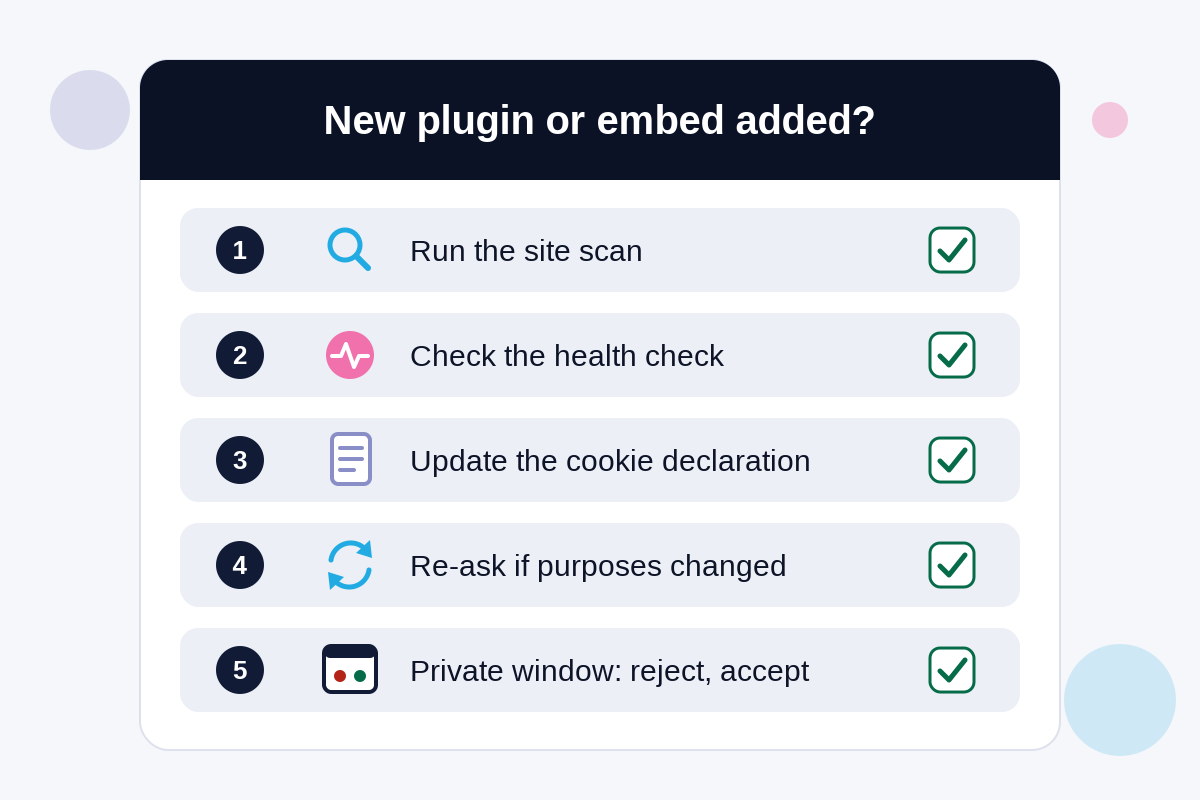
After every new plugin or embed:
- Run the site scan.
- Check the health check and fix anything flagged.
- Confirm the cookie declaration shows the new service.
- Ask visitors again if the purposes changed.
- Test in a private window: reject all, then accept all.
What AriConsent does not do
It is not a Google-certified CMP and does not support IAB TCF. Google requires AdSense, Ad Manager and AdMob publishers to use a Google-certified CMP integrated with the IAB TCF when serving personalised ads in the EEA, the UK and Switzerland. If you run those ads, AriConsent is not the right tool for that site.
Installing it does not by itself make your site meet the law. A banner is a tool. You still have to:
- decide what each tracker is used for and put it in the right category
- write clear, honest banner and policy texts
- keep your list of services up to date as the site changes
- judge which cookies are strictly necessary and which need consent
In Norway, ekomloven § 3-15 requires prior consent that meets the GDPR standard for cookies and similar technologies. Datatilsynet’s guide explains that Datatilsynet and Nkom share supervision, and that the business using the cookies is responsible. Nkom’s page on informasjonskapsler covers what users must be told.
You may not need a banner at all. Datatilsynet notes that if you only use cookies covered by the exemptions in § 3-15 second paragraph, you neither need nor should have a consent banner.
This article is general information, not legal advice.
Because the plugin makes no outside requests, there is no hosted dashboard and no cookie scanning on outside servers. Everything happens in your WordPress admin.
How to install and set up AriConsent
- In WordPress, go to Plugins → Add New, search for “AriConsent”, click Install, then Activate.
- Open the AriConsent settings and check the banner texts. Say what you use, why, and who receives the data.
- Run the site scan and confirm the services it finds. Add any tracker or embed it missed.
- Choose your Google Consent Mode setting. Leave it on basic unless you and your adviser have decided otherwise.
- Add
#cookie-settingsin your footer menu. - Open the health check and fix anything it flags.
- Test in a private browser window. Click “Reject all” and confirm that no trackers or embeds load. Then reopen the settings, accept, and confirm that they do.
For the test, the Network tab in your browser’s developer tools shows which requests go out. If a Google or Microsoft request appears after “Reject all” in basic mode, go back to the health check.
Next steps and where to get help
- AriConsent is free, with no traffic limits.
- The banner, blocking and consent log run on your own site, with no requests to us.
- Google Consent Mode v2 runs in basic mode by default; advanced is optional.
- It is not a Google-certified CMP and has no IAB TCF support.
Download it from AriConsent on WordPress.org. Use the support forum there for questions and bug reports, so answers are public and help the next person.
The plugin is new, and feedback from real sites is the most useful thing you can give us. Tell us what worked, what confused you, and which trackers the scan missed.
More details are on the AriConsent product page. If you are also tidying up titles, sitemaps and redirects, take a look at our free SEO plugin, AriSEO.
Frequently asked questions
Do I need a cookie banner if my site only uses necessary cookies?
No. Datatilsynet's guidance on cookies says that if your site only uses cookies covered by the exemptions in ekomloven § 3-15 second paragraph, you neither need nor should have a consent banner. Check carefully which cookies are truly strictly necessary before deciding. This is general information, not legal advice.
Can I use AriConsent on a site that shows Google AdSense ads?
Not for personalised ads in the EEA, the UK or Switzerland. Google requires AdSense, Ad Manager and AdMob publishers to use a Google-certified consent management platform integrated with the IAB Transparency and Consent Framework when serving personalised ads there. AriConsent is not Google-certified and does not support IAB TCF, so for those sites you should choose a different tool. Google's AdSense Help explains the requirement.
Will my Google Analytics numbers drop when visitors can reject?
Visitors who reject are not measured in basic consent mode, which is AriConsent's default. Google says that in basic mode no data is sent before consent. Advanced mode sends cookieless pings while consent is denied, which feeds Google's modelling, but it means some data reaches Google even after a visitor says no. Decide on advanced mode together with your privacy adviser.
Does AriConsent work with WooCommerce?
Yes, through the WP Consent API. This is a separate free plugin on WordPress.org that lets plugins share consent choices with each other. With both AriConsent and the WP Consent API installed, WooCommerce waits for consent by itself. Do not install the WP Consent API without a banner plugin, because on its own it treats consent as given.
Will free features in AriConsent ever become paid?
No. AriHub's promise is that free features never move behind a paywall. What AriConsent does in its free version on WordPress.org today, including the banner, tracker blocking, Google Consent Mode v2, the consent log and the WP-CLI commands, stays free.
Sources
- AriConsent – WordPress.org
- Consent mode overview – Google for Developers
- About consent mode – Google Analytics Help
- Help with the EU user consent policy – Google
- Google consent management requirements for publishers – AdSense Help
- WP Consent API – WordPress.org
- Samtykke til bruk av informasjonskapsler – Datatilsynet
- Bruk klare og enkle formuleringer i knapper – Datatilsynet
- Informasjonskapsler – Nkom