
This guide shows you how to write a title tag and a meta description that Google is more likely to show as written and that make searchers want to click. It is based on Google’s and Bing’s own documentation, not on character-count rules of thumb. You get patterns by page type, a WordPress checklist and a simple Search Console method for checking whether a change worked.
What the title tag and meta description actually do
Title link vs snippet
Google calls the clickable headline in a search result the title link and the text under it the snippet. You suggest the first with the <title> element and the second with the <meta name="description"> tag. Google decides what it actually shows.
The two tags do different jobs. Google’s SEO Starter Guide says a good title is unique to the page, clear and concise, and accurately describes the page. The same guide notes that title text is also used in browsers and bookmarks, so people keep seeing it after they click.
Google has said that accurate meta descriptions can improve clickthrough but won’t affect your ranking. The description’s job is to persuade, not to rank.
Does it matter outside Google?
Yes. Bing’s guidelines state that missing, duplicate or overly short title tags and meta descriptions may reduce indexing reliability, ranking and eligibility for grounding results and citations. In practice, that can affect whether Bing cites your page in AI-generated answers, not only where it appears in the classic list of links.
The takeaway is the same for every search engine: write both tags for the person deciding whether to click.
Why Google sometimes shows a different title or description
Where Google gets the title
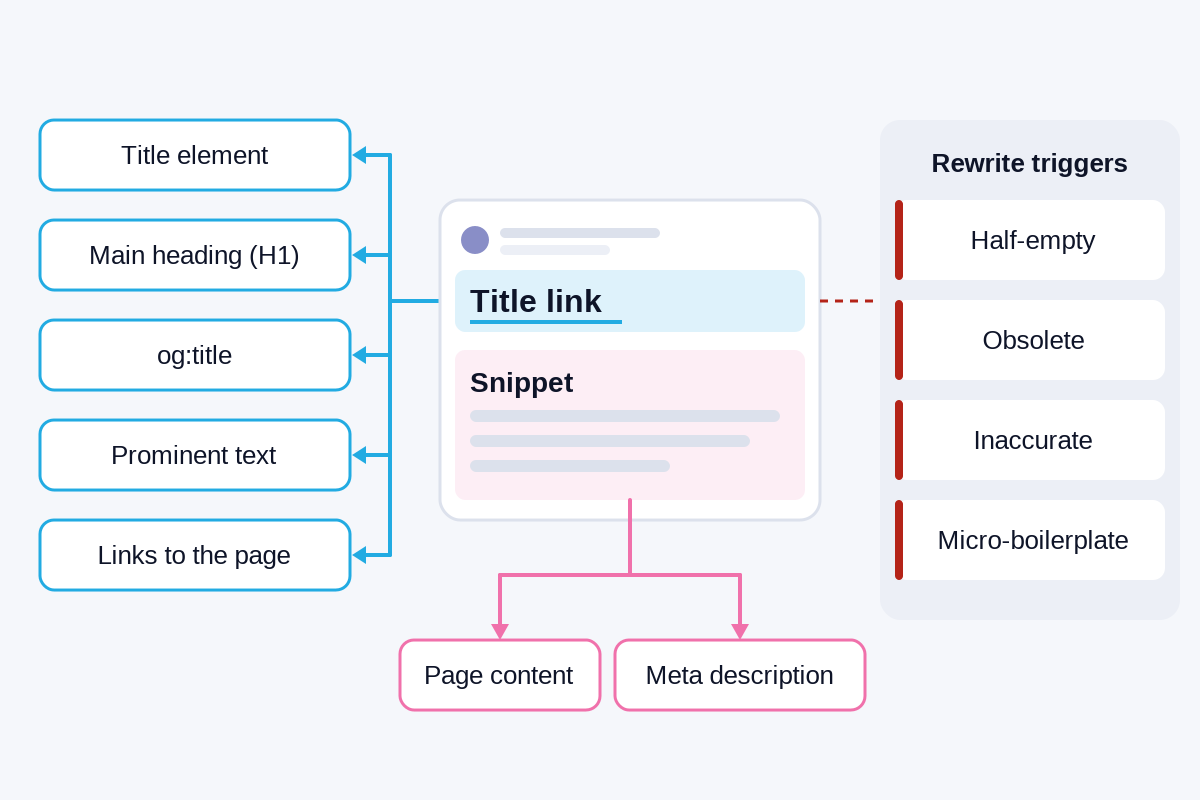
Google’s title link generation is completely automated, and your title element is only one source. The sources Google documents include:
- the
<title>element - the main visual title on the page
- heading elements such as the H1
- the
og:titlemeta tag - other large, prominent text on the page
- anchor text on the page, and text in links that point to the page
In September 2021 Google said it used the title element around 87% of the time, up from around 80%. Treat that as a 2021 figure, not a current rate. It will not tell you what happens to your own pages.
Common title problems Google fixes
Google’s title link documentation lists common issues that lead it to choose another title:
- Half-empty titles: part of the title is missing, for example “| Site name” with no page name in front. This often happens when a template field is empty.
- Obsolete titles: the title still mentions an old year or old details, while the page has been updated.
- Inaccurate titles: the title does not reflect what the page is actually about.
- Micro-boilerplate: many pages share almost the same title, so the title no longer tells them apart.
- Site name repeated: the site name appears twice in one title.
The same page also advises against keyword stuffing and long boilerplate titles.
Snippets work differently. Google creates them mainly from the page content, and uses your meta description when it gives users a more accurate picture of the page. Because of this, the snippet for one page can vary from one search to another.
Structured data can add details around a result, but it does not replace a clear title and a clear opening paragraph.
The 2026 AI headline experiment
In March 2026 Google confirmed a small experiment using AI to change headlines and titles from other websites in Search results. According to the same report, Google said a full launch would not use a generative model.
We are not aware of any documented way to opt out of title rewrites. Your best defense is an accurate title that matches your H1.
Quick diagnostic: search for the page in Google and compare the title link and snippet with your own tags. If they differ, check the page against the problems above before you reword anything.
How to write a title that earns the click
A simple title formula
- Name what the page is in the words a searcher would use. Test it: does the title alone answer “is this what I was looking for?” It helps to match the search intent behind the query.
- Add what makes the page different: the location, the scope, the format (“checklist”, “price list”) or the audience.
- Add the brand once, at the end, or at the start for the home page, with a separator such as “|” or “–”.
This fits Google’s advice in its title link guide: make titles descriptive, concise and unique for each page, avoid vague titles such as “Home”, and do not stuff in keywords.
Length: Google sets no limit on how long a title element can be. It shortens the title link as needed, typically to fit the device width. Instead of counting characters, put the important words first so the meaning survives if the end is cut off.
Years: only include a year if the page really is updated for that year and you will keep it current. A leftover year is the “obsolete” pattern Google rewrites.
Consistency: keep the title, the H1 and og:title in line. They can be worded differently, but they should describe the same thing.
Language: write the title in the same language as the page. On Norwegian or bilingual sites, check that a Norwegian page has not inherited an English title from a theme or template.
Before and after examples
These examples were written for illustration. They are not results from real sites.
| Before | Problem | After |
|---|---|---|
| Home | Vague | Example Plumbing – plumber in Drøbak and Frogn |
| Services | Example Plumbing | Example Plumbing | Vague, site name repeated | Bathroom renovation and leak repairs | Example Plumbing |
| Best SEO tips 2023 SEO tips SEO guide | Obsolete year, keyword stuffing | SEO tips for small business websites: a practical guide |
| | Example Shop | Half-empty (product name missing) | Merino wool socks, 3-pack | Example Shop |
How to write a meta description that earns the click
What to put in
A good meta description summarizes the page in plain words. It answers one question: what will I get if I click?
Google suggests including concrete facts about the page. For blog posts, that means the author and publication date. For products, it means details such as the price and the manufacturer. For a local business page, we suggest what you offer, where you are and your opening hours.
Length: Google’s snippet documentation says there is no limit on how long a meta description can be. The snippet is truncated as needed, typically to fit the device width, so put the key point in the first sentence.
Prioritize: if you are short on time, Google suggests at least writing descriptions for critical URLs like the home page and popular pages.
What to leave out
- Keyword lists. They read as spam and do not help anyone decide.
- The same description on every page. Each description should be unique to its page.
- Promises the page does not keep. If the description over-promises, the visitor leaves and the click is wasted.
- Hype and long calls to action. A short, natural line such as “See prices and opening hours” is enough.
Bad vs better examples
These were also written for illustration.
- Bad: “Welcome to our website. We offer the best services at great prices. Contact us today!”
Better: “Plumber in Drøbak and Frogn. Leak repairs, bathroom renovation and heat pump installation. Open weekdays 7–16.” - Bad: “socks, wool socks, merino socks, cheap socks, buy socks”
Better: “Merino wool socks in a 3-pack from Example Brand. Sizes 36–46, machine washable at 40 °C.”
Title and description patterns by page type
Use this table as a starting point. The right facts depend on what the searcher needs in order to decide whether to click.
| Page type | What the searcher needs to see | Title pattern | Description pattern |
|---|---|---|---|
| Home page | Who you are and what you do | Brand – main offer (+ area) | What you offer, for whom, where; one proof point you can back up |
| Service page | That you do this specific job | Service (+ area) | Brand | Scope of the service, area, how to book |
| Product page | The exact product and its price | Product name, variant | Brand or shop | Price, manufacturer, key specs, delivery |
| Category page | The range available | Category (+ qualifier) | Shop | What the range covers, brands, filters |
| Blog post | The answer or the angle | Topic: the specific benefit or format | What the post covers, author, date |
| Local or location page | That you serve this place | Service in place | Brand | Address or area, opening hours, contact options |
| Local service page (Norwegian) | The same, in Norwegian | Rørlegger i Drøbak | Eksempel Rør | Lekkasjer, baderom og varmepumper i Drøbak og Frogn. Åpent hverdager kl. 07–16. |
For more on each page type, see our checklist for optimizing blog posts, our guide to SEO for product pages and our article on local SEO for small businesses.
Setting it up at scale in WordPress
Template mistakes that trigger rewrites
SEO plugins build titles and descriptions from templates with variables, for example %title% %sep% %sitename%. That saves time, but it can also create the problems Google rewrites:
- An empty variable gives you a half-empty title.
- One shared pattern for every page gives you micro-boilerplate.
- A year hard-coded in a template goes stale.
Check your templates against this list:
- No variable can end up empty. Test with a draft that has no excerpt, no category and no featured image.
- No single description is shared across all posts or products.
- No template contains a hard-coded year.
- The site name appears only once, and the theme does not add it a second time.
og:titlefollows the same pattern as the title tag.- Archive, tag and search pages do not all produce identical titles.
Write the important pages by hand: the home page, main service and category pages, and your best-performing posts. Let templates cover the long tail, and make sure each template pulls in facts that differ from page to page.
If you want one place to manage this, AriSEO, our free SEO plugin on WordPress.org, has fields for titles and descriptions, social previews, a site audit and imports from other SEO plugins. It will not write good titles for you, so the checklist above still applies.
Snippet controls
Google documents several snippet controls. Use them sparingly: a shorter or missing snippet gives searchers less to go on.
nosnippet: no text snippet is shown for the page.max-snippet:[number]: sets a maximum snippet length.data-nosnippet: an HTML attribute that keeps a specific part of the page, such as a cookie notice, out of snippets.notranslate: Google may show translated title links and snippets, and this meta tag tells Google not to provide a translation. It can be useful if you already publish separate Norwegian and English versions.
Measure and improve with Search Console
Search Console’s Performance report shows clicks, impressions and CTR. It defines CTR as the click count divided by the impression count, and shows the past three months by default. If you are new to the tool, start with our guide on how to use Google Search Console.
Find pages worth rewriting
- Open the Performance report, go to the Pages tab and turn on all four metrics.
- Sort by impressions. These are the pages people already see in search.
- Look for pages with a lower CTR than other pages at a similar average position. Compare like with like, because position affects how often a result gets clicked.
- Search for those pages yourself and compare what Google shows with your tags. If Google has replaced your title, fix the cause (half-empty, obsolete, inaccurate, boilerplate) rather than tweaking the wording.
Run a simple before/after check
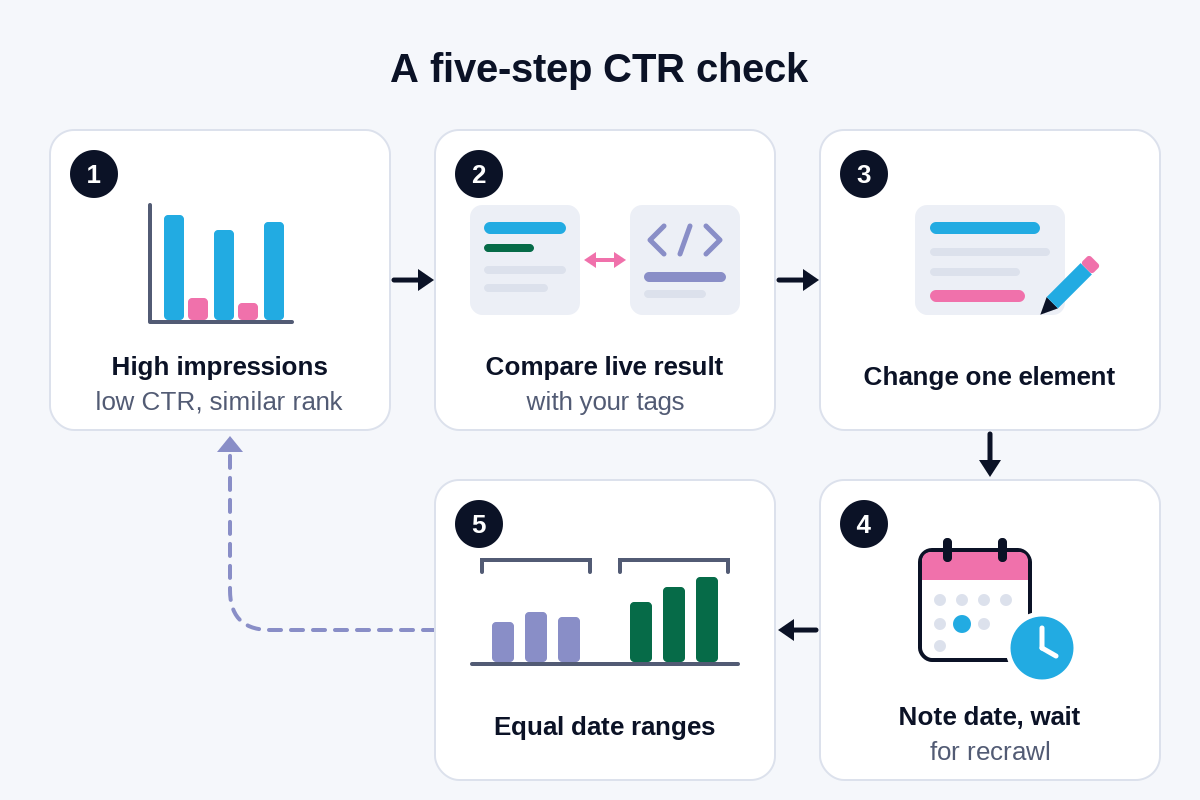
- Change one thing per page: the title or the description, not both.
- Write down the date and what you changed.
- Wait until Google has recrawled the page and the new version shows in the live results. How long that takes varies.
- Compare equal periods before and after the change, for the same page and similar queries.
Read the results with care. CTR also moves with position, device, season and search features such as AI summaries above the results, so not every dip is a copy problem. That is why we give no benchmark CTR numbers here.
Checklist: titles and descriptions in ten minutes per page
- The title is unique and matches the H1.
- The important words come first, and the brand appears once at the end.
- There is no year unless the page really is updated for it.
- The title and description are in the same language as the page.
- The description is unique and factual, with the key point in the first sentence.
- The description promises only what the page delivers.
- Templates produce no empty fields and no repeated site name.
og:titleis consistent with the title tag.- After recrawl, you check the live result and compare equal periods in Search Console.
Next step: open Search Console, pick the five pages with the most impressions and run them through this checklist.
Frequently asked questions
Should I put the current year in my title?
Only if the page really is updated for that year and you will keep it current. Google lists obsolete titles, such as an old year left in place after the content changed, as a reason it may rewrite a title. An evergreen page usually doesn't need a year. If you do use one, don't hard-code it in a template, where it is easily forgotten.
Can I stop Google from rewriting my title or description?
We are not aware of any documented opt-out for title rewrites. You can reduce the chance by fixing the problems Google lists (half-empty, obsolete, inaccurate and boilerplate titles, or a repeated site name) and by keeping your title, H1 and og:title consistent. For snippets, you can limit or block them with nosnippet, max-snippet or data-nosnippet, but a shorter or missing snippet gives searchers less to go on.
Is a meta description worth writing if Google often writes its own snippet?
Yes, for important pages. Google says it uses your meta description when it describes the page more accurately than text from the page, and Bing names missing or duplicate descriptions as a problem. Prioritize the home page and the pages with the most impressions. Also make the first paragraph of each page clear, because Google builds snippets mainly from page content.
Does the og:title for social sharing affect Google?
It can. Google lists og:title among the sources it may use for the title link. Keep it consistent with your title tag and H1. It can be worded slightly differently for social feeds, but it should describe the same page.
How long does it take before a new title shows in Google?
A new title only appears after Google recrawls the page, and the timing varies, so there is no fixed number. Check the live search result again after a while. Once the new version shows, compare equal date ranges before and after the change in Search Console's Performance report before you decide whether it worked.
Sources
- Influencing your title links in search results – Google Search Central
- Control your snippets in search results – Google Search Central
- SEO Starter Guide – Google Search Central
- Meta tags and attributes that Google supports – Google Search Central
- Improve snippets with a meta description makeover – Google Search Central Blog
- More information on how Google generates titles for web page results – Google Search Central Blog
- Google Search test replaces headlines and website titles with AI – 9to5Google
- Performance report (Search results) – Search Console Help
- Bing Webmaster Guidelines
Leave a Reply
You must be logged in to post a comment.