From the first backup to a restored site
Screenshots from our test shop with WordPress 7.1 and WooCommerce 11.3. The shop, its addresses and its week of backups are made up.
Proof on every backup
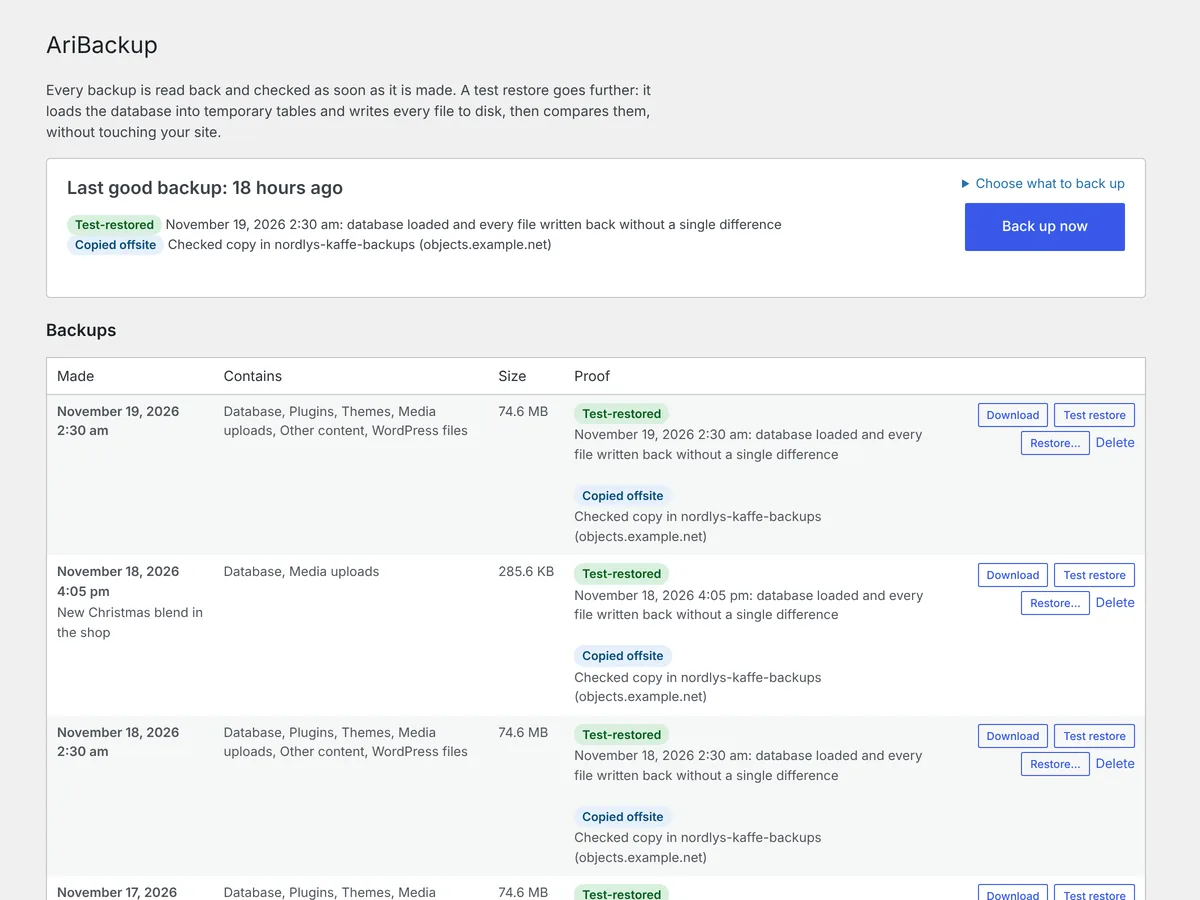
Each backup says how far it has been proven: Verified, Test-restored, Copied offsite, or Failed its check with the reason in plain words. The last good backup is at the top, so you see at a glance whether you are covered.
Made for ordinary hosting
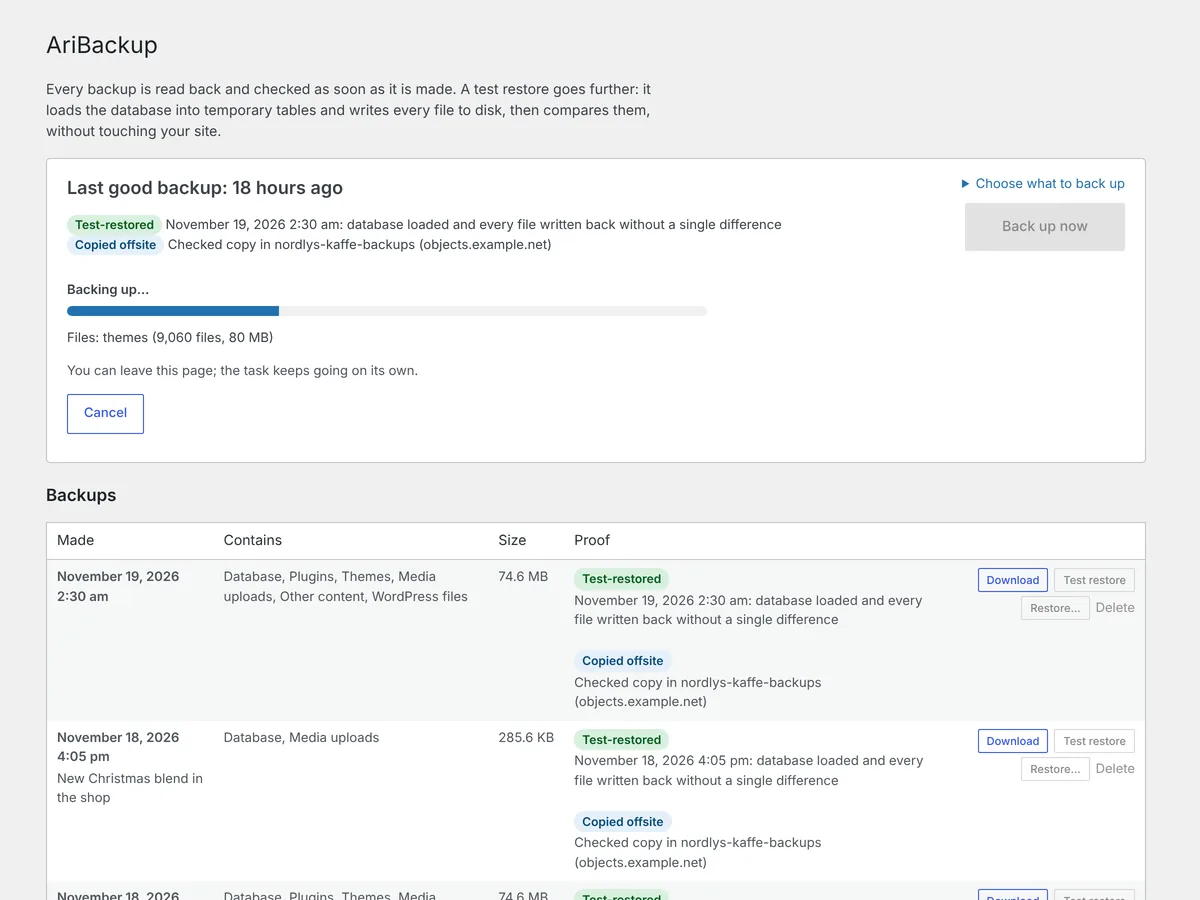
Backups run in short steps that stay under your host's time limits, with progress you can watch or leave. If a step is cut off, the next one carries on from the last good point, so a crash never leaves you with a broken archive that looks fine.
Restore what you choose, with a way back
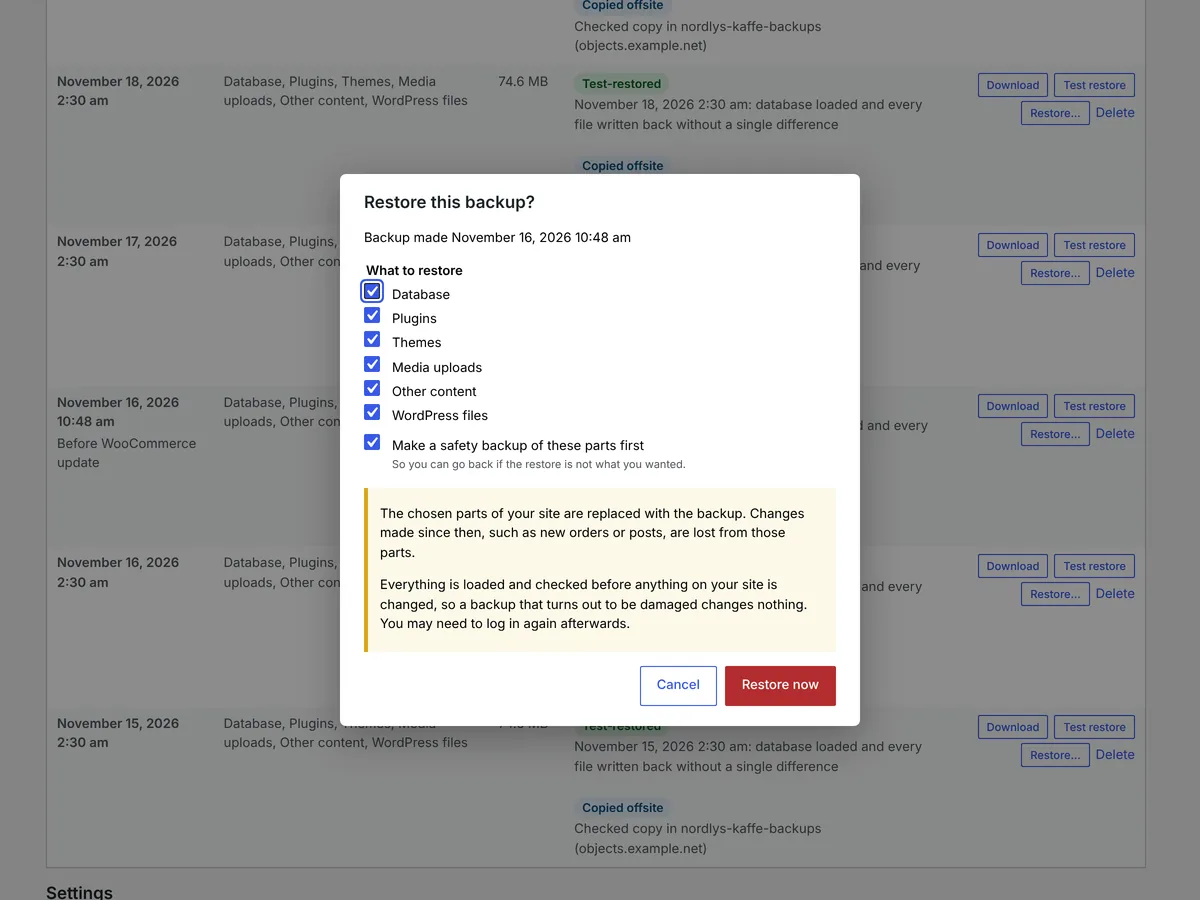
Pick the parts to restore, for example only the database. A safety backup of those parts is made first. Everything is loaded and checked before your site changes, then swapped in at once, so a damaged backup changes nothing.
When WordPress will not load
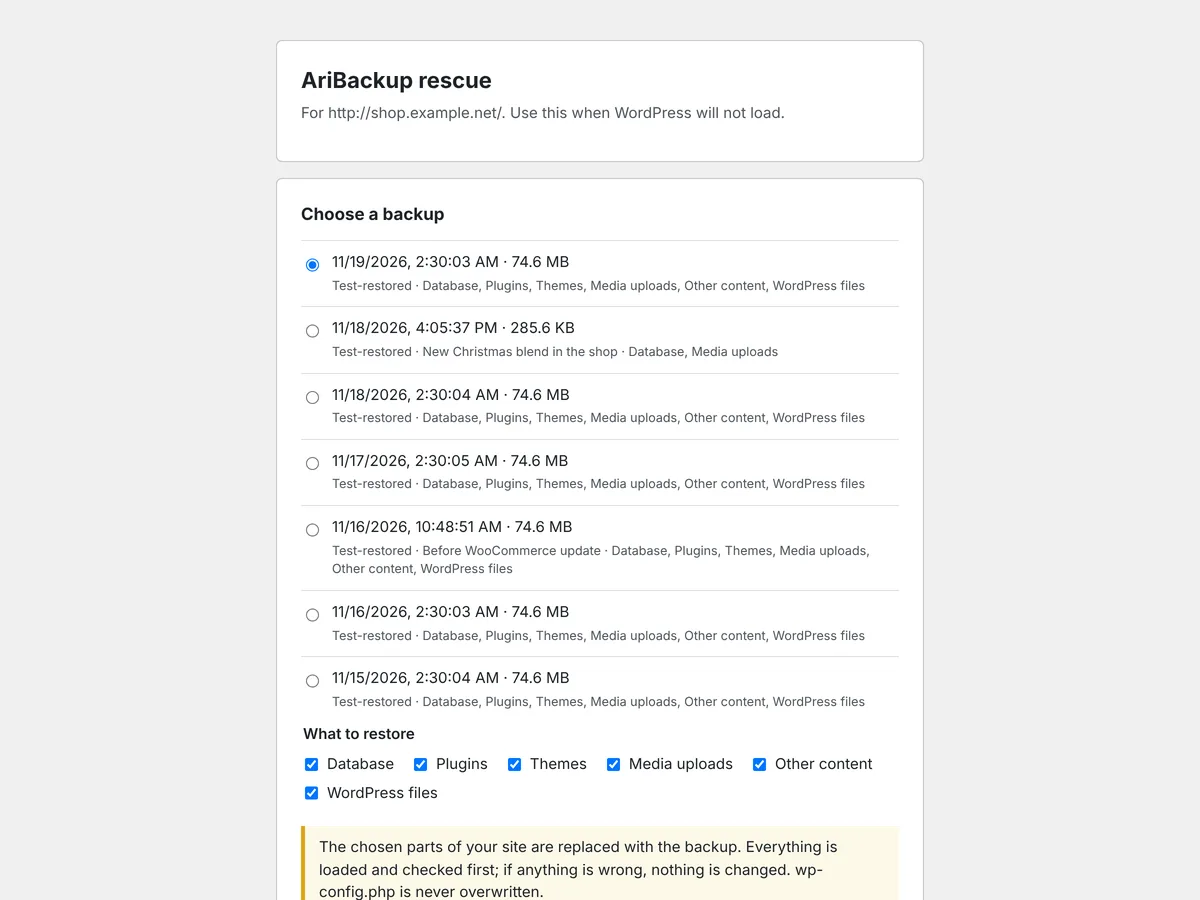
A broken plugin or a failed update can lock you out of WordPress, and out of every backup plugin with it. Download the rescue file while your site works. When you need it, upload it, enter its code and choose a backup. It locks after ten wrong codes, stops working 24 hours after it is unlocked and deletes itself after a restore.
Set it once
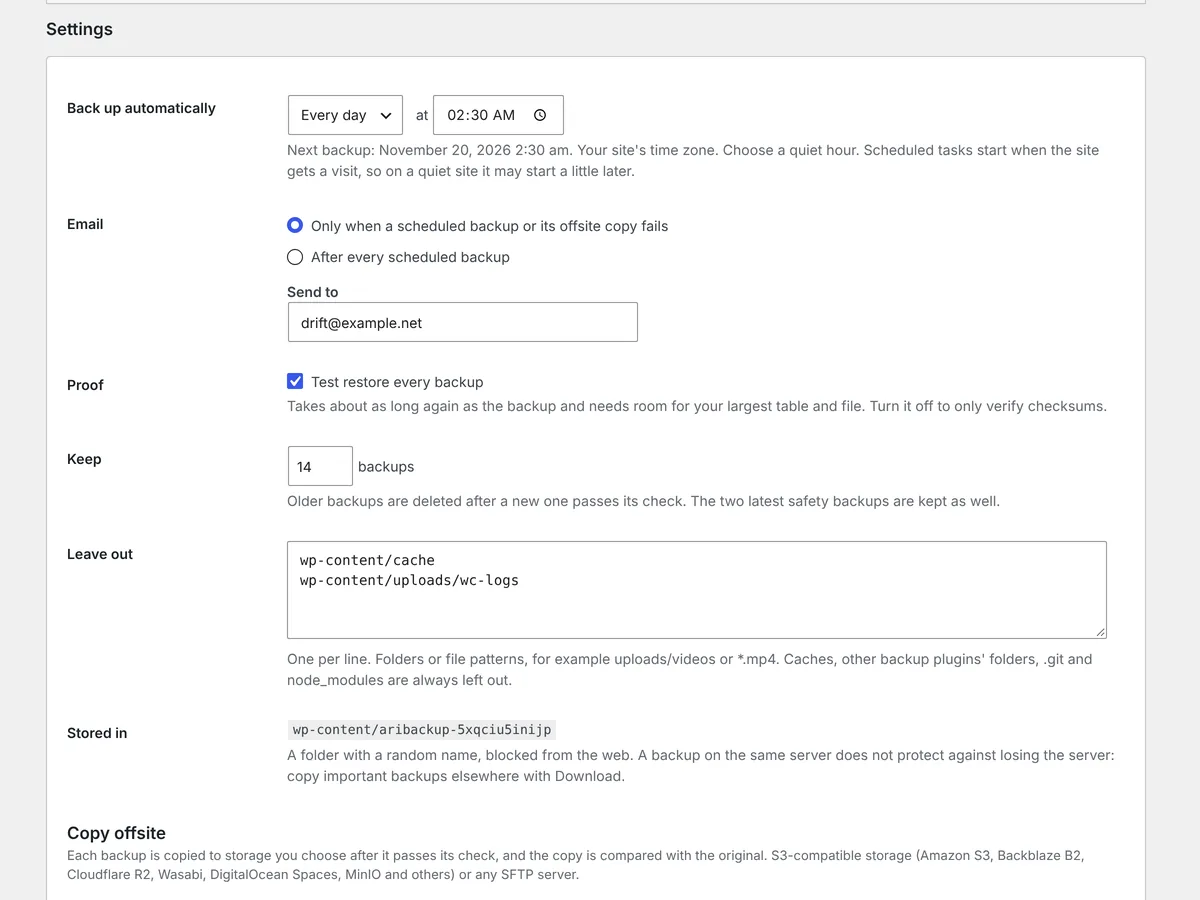
Daily or weekly at a quiet hour in your site's time zone. An email only when something fails, or after every backup if you prefer. Keep as many backups as you like, and leave out folders you do not need, such as caches and logs.
A copy somewhere else
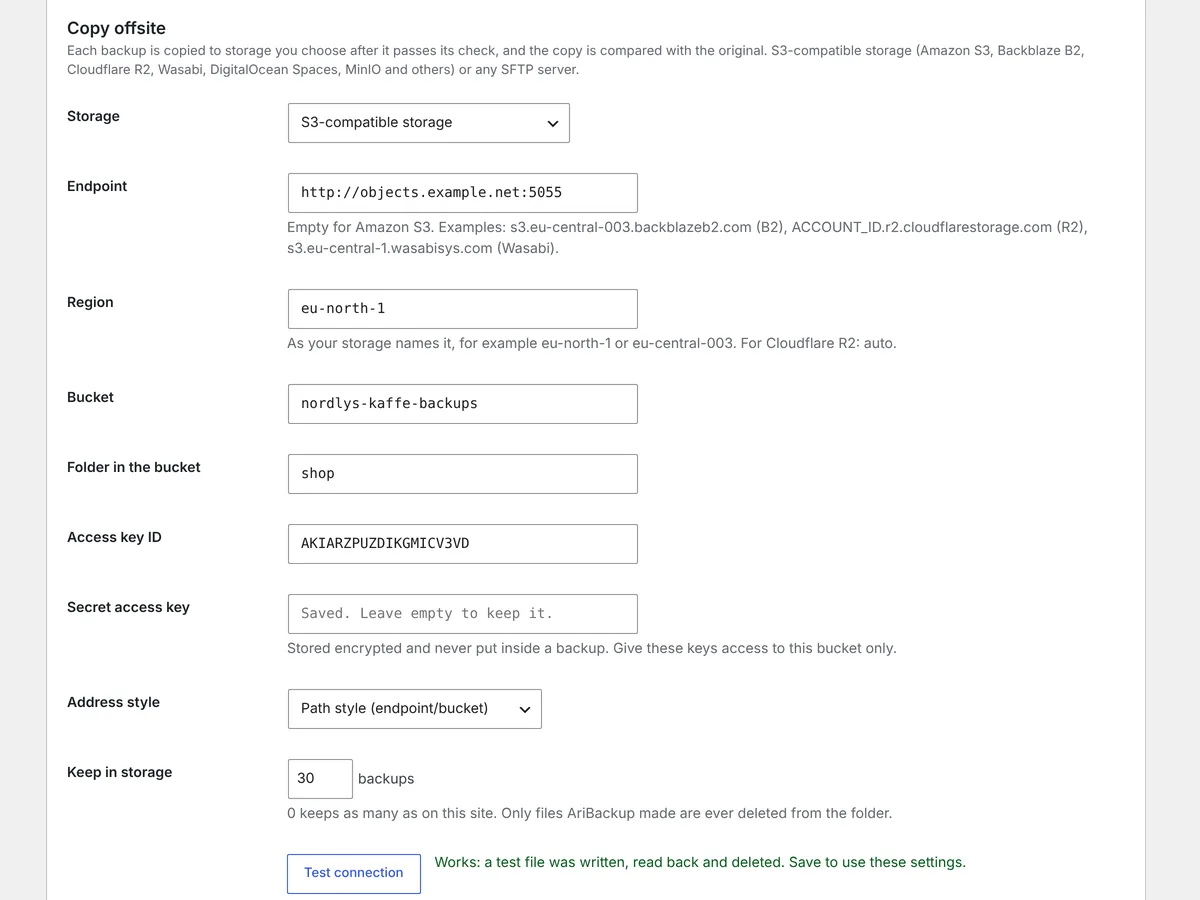
A backup on the same server does not survive losing the server. AriBackup copies each checked backup to S3-compatible storage (Amazon S3, Backblaze B2, Cloudflare R2, Wasabi, MinIO and others) or to any SFTP server, and compares the copy with the original. Keys are stored encrypted and never put inside a backup.
Three checks, every time
A backup only counts when it has been read back. These checks run after every backup by default; you can also run them again on any backup with one click.
Pack the site and write a manifest
The database is exported in pieces that can each be loaded on their own, the files are packed into a standard .tar.gz, and a manifest records the size and SHA-256 of every entry.
Read every entry back
The archive is read from start to end. Every entry must match the manifest, the manifest inside must match the one outside, and the whole file must match its own checksum.
Load it, without touching your site
Every table is loaded into temporary tables and its rows counted, and every file is written to a scratch folder and compared. All of it is removed straight after. Your live tables and files are never touched.
The details that matter on a bad day
A backup is only tested for real when something has gone wrong. These are the parts we built for that day.
A standard archive
Backups are ordinary .tar.gz files that 7-Zip, macOS and any Linux server can open, with database files you can import yourself. You are never locked in.
Never half restored
Tables are loaded under temporary names and swapped in with one rename. wp-config.php is never overwritten, and AriBackup keeps its own settings, so it is still there after a restore.
Only what it wrote
A restore runs only the kinds of statements AriBackup's own export writes, and refuses file paths that try to leave their folder. A tampered archive cannot slip in anything else.
Private by default
Backups live in a folder with a random name, blocked from the web on Apache, LiteSpeed and IIS. Storage keys are encrypted with your site's own keys and never end up inside a backup.
Crash-safe
After each step the good length of the archive is saved. If PHP is stopped mid-step, anything after that point is cut off before the backup carries on.
In Norwegian
The plugin, its emails and the rescue page are in Norwegian Bokmål and Nynorsk as well as English.
What it does not do yet
No multisite
AriBackup backs up and restores single sites. On a multisite network it refuses to restore rather than guess.
No moving to a new address
A backup restores to the site it was made on. Moving a site to another domain, with the addresses inside the database rewritten, is not built yet.
Busy shops: pick a quiet hour
Tables are exported one after another, not in a single snapshot. On a shop that takes orders around the clock, schedule backups for the quietest hour of the night.
Schedules need visits
Like all WordPress schedules, a backup starts when the site gets a visit after the chosen time. On a very quiet site it may start a little later.
Want to see your backup restore? Test it
We are looking for a few WordPress sites to test AriBackup before it is released. Tell us roughly how large your site is, who hosts it, and where you would like copies kept.
Frequently asked
Is AriBackup free?
Yes. Scheduled backups, test restores, the rescue file and offsite copies to S3-compatible storage and SFTP are all in the free plugin.
How long does a test restore take?
About as long again as the backup, and it needs free space for your largest table and file. If that is too much for your hosting, turn it off and AriBackup only verifies the checksums.
Where are my backups kept?
In a folder in wp-content with a random name, blocked from the web. Because a copy on the same server does not survive losing the server, add offsite storage or download important backups.
Can I open a backup without AriBackup?
Yes. It is a standard .tar.gz file. Inside are your files as they were and the database as SQL files that phpMyAdmin or the mysql command can import.
Does it work with WooCommerce?
Yes; our test shop runs WooCommerce 11.3. Restoring the database brings it back to the moment of the backup, so orders placed since then are lost from it, and the restore screen says so before you start.
Which versions does it need?
WordPress 6.4 and PHP 7.4 or newer. It is tested with WordPress 7.1 and PHP 8.3 on MariaDB.