See every deal and what to do next
Most WordPress CRMs are either a mailing list tool or a contact book. AriCRM is both, and the sales side is not an afterthought.
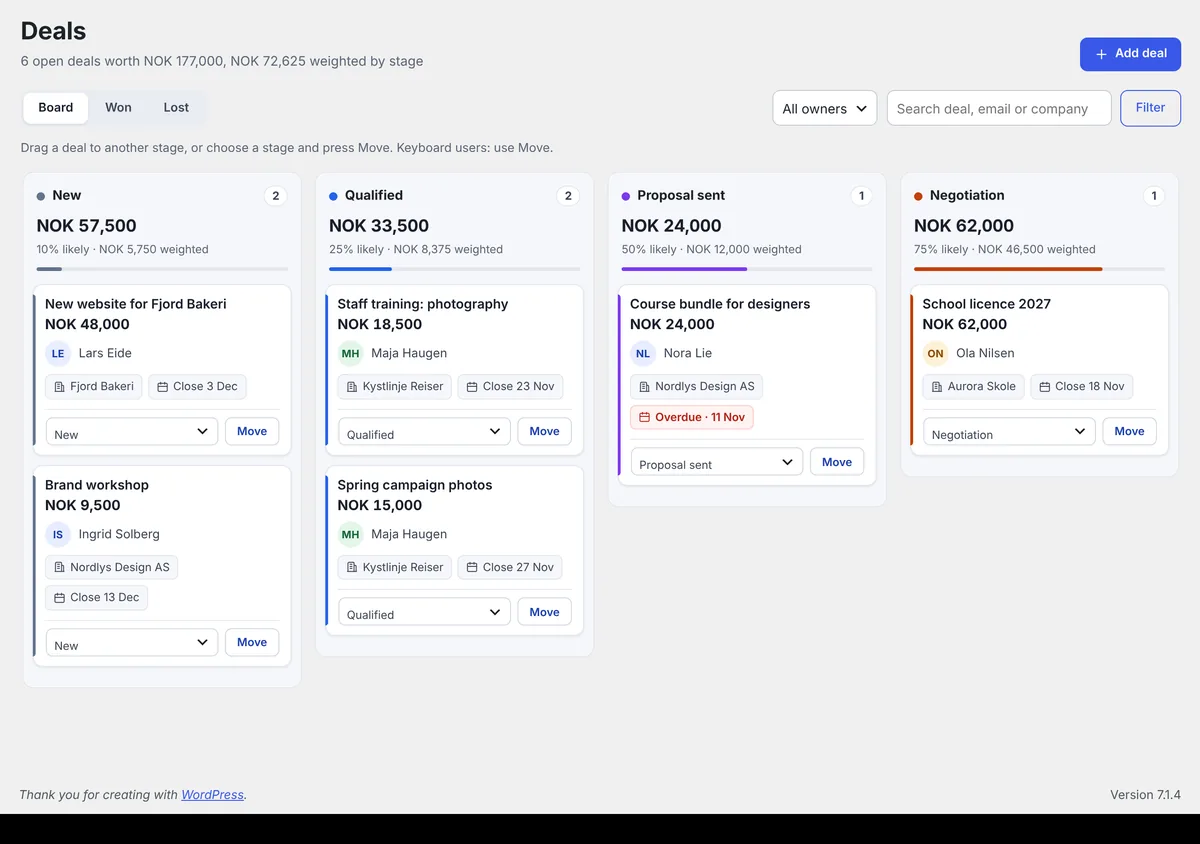
A pipeline you can read at a glance
Drag deals between your stages, or choose a stage and press Move, which works from the keyboard and without JavaScript. Each stage shows its total and the value weighted by how likely it is to close. Mark deals won or lost with a reason; winning one makes the contact a customer.
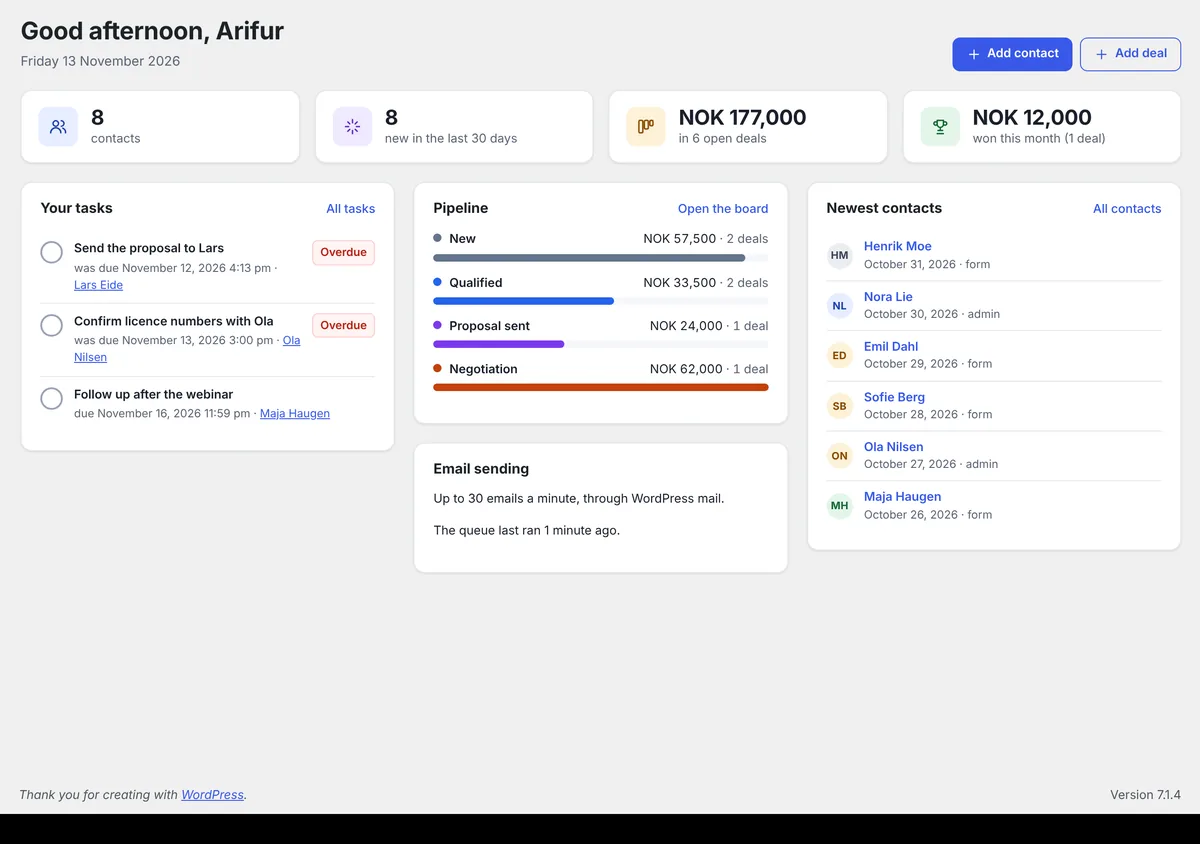
A dashboard that starts your day
Contacts, new sign-ups, the value of open deals and what you won this month. Your tasks for the week with overdue ones marked, the pipeline as a chart, and the newest contacts.
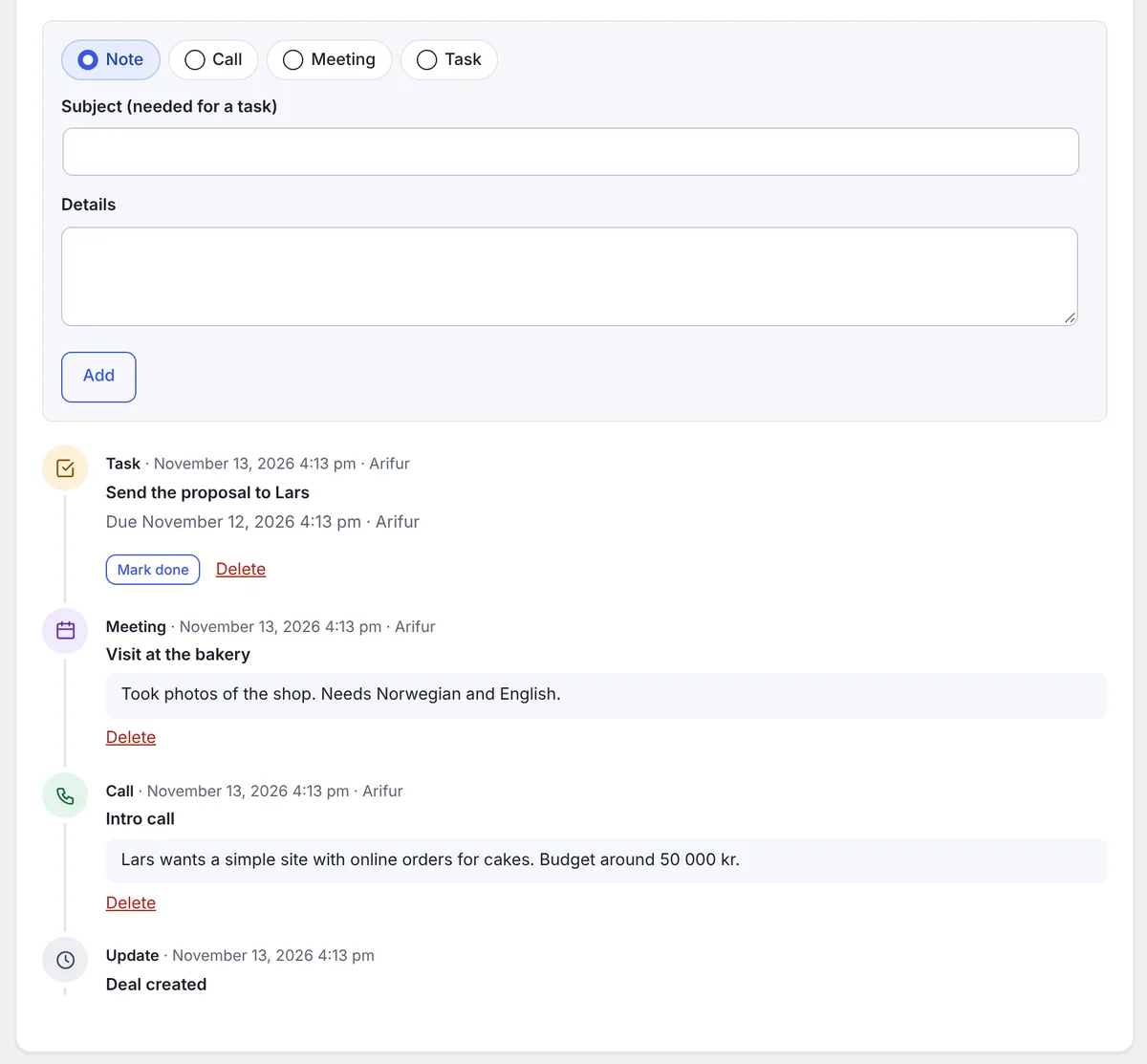
The whole story on every contact
Notes, calls, meetings and tasks on one timeline, with the emails that went out and every change along the way. The same timeline sits on every company and every deal.
Newsletters people asked for, and can leave in one click
Since 2024 Gmail and Yahoo reject bulk email that does not follow their rules, and the damage falls on your whole domain. AriCRM builds the rules in.
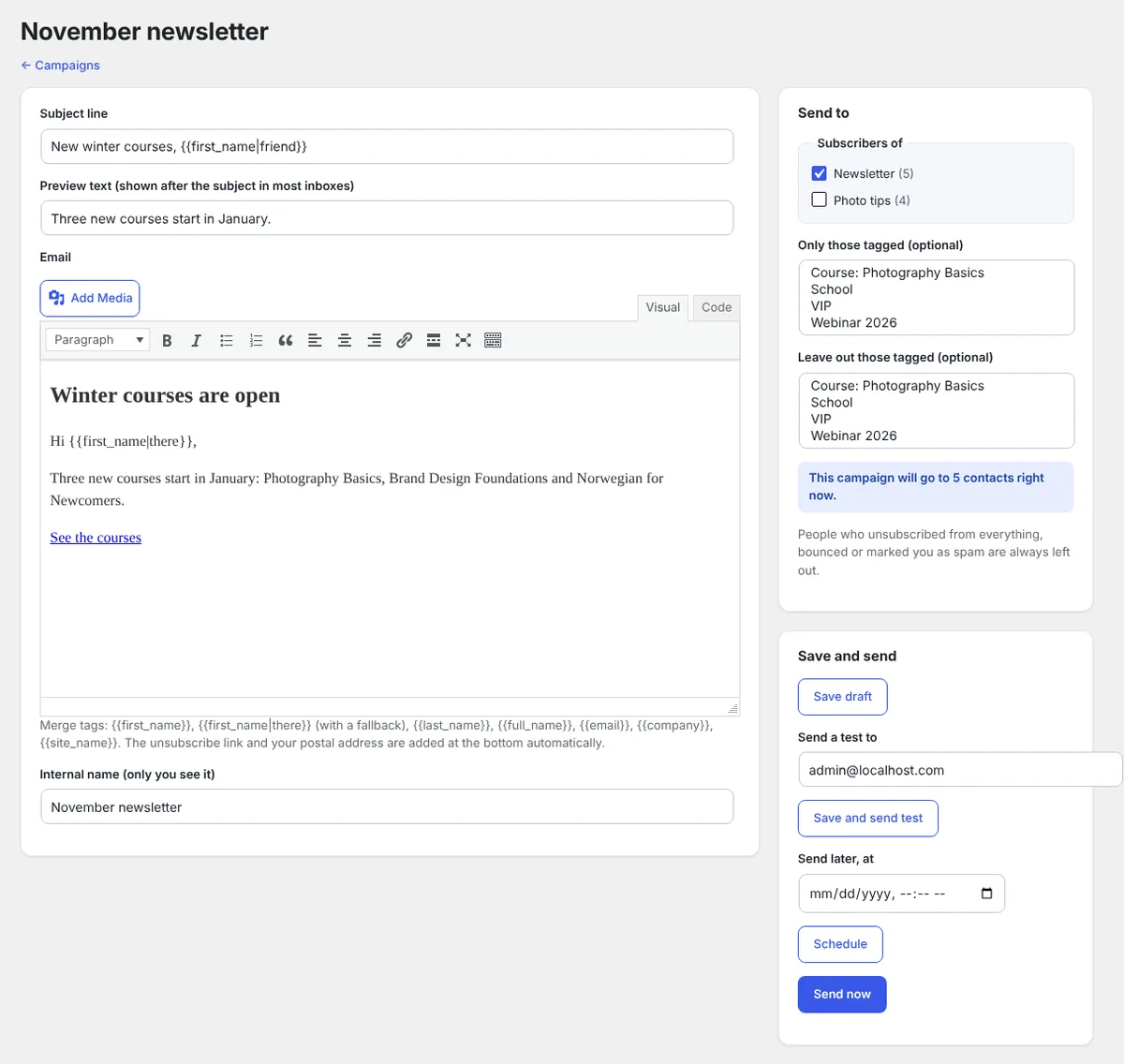
Campaigns to the right people
Send to one or more lists, only to contacts with certain tags, or leave some out. The screen tells you how many people the email reaches right now. Merge tags such as {{first_name|there}}, test sends, sending now or later, and a queue with a per-minute limit that you can pause or cancel.
Compliant by default
Every marketing email carries one-click unsubscribe headers (RFC 8058), an unsubscribe link, a preferences page and your postal address. Campaigns will not send without the address. Someone who unsubscribed is only added back by their own new sign-up, never by an import or a team member.

Sign-up forms with proof of consent
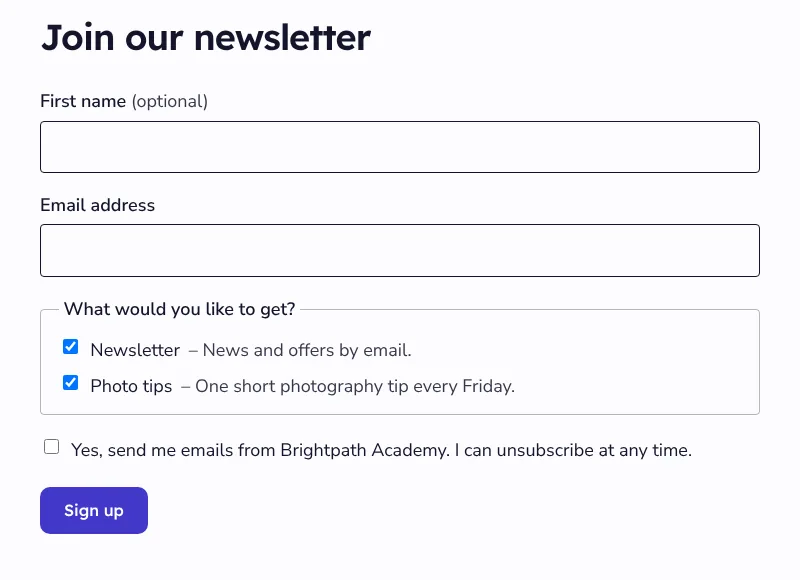
Add the sign-up form block or the [aricrm_form] shortcode. Double opt-in is on by default, and each sign-up stores when it happened, where, the exact text the person agreed to and their IP address at that moment. Spam is held back without a CAPTCHA, and the form follows your theme.
Switch in one click, or import any CSV
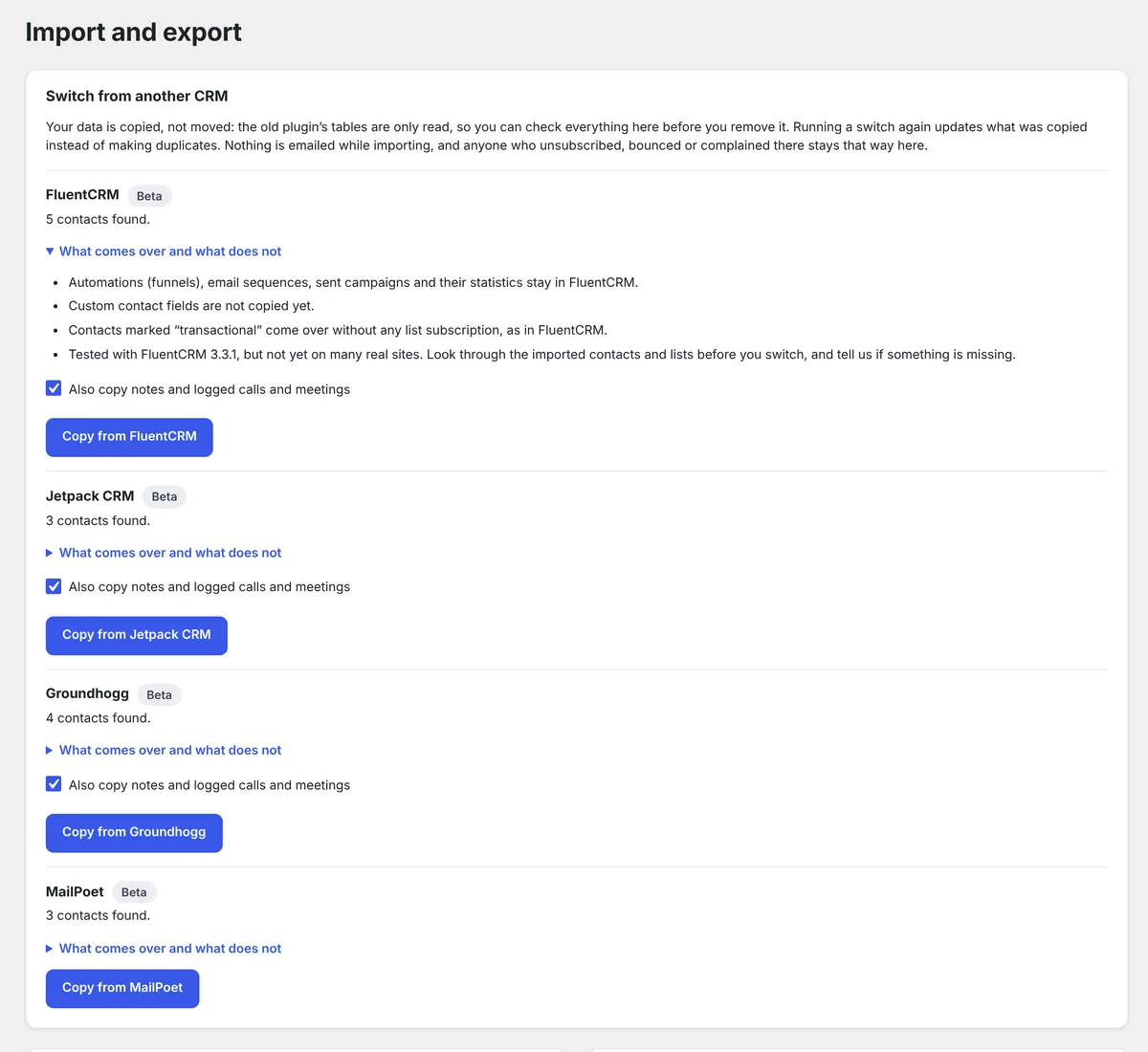
Using FluentCRM, Jetpack CRM, Groundhogg or MailPoet on the same site? AriCRM finds their data and copies contacts, companies, tags, lists, custom fields and notes. Every unsubscribe, bounce and spam complaint comes with them, nothing is emailed while importing, and the old plugin is only read, so you can check everything before you remove it. Run it again and it updates instead of duplicating.
Leaving Mailchimp, HubSpot, Brevo, ActiveCampaign, Kit, Pipedrive, Salesforce or Zoho? Export a CSV: AriCRM recognises their column names, turns lifecycle stages into statuses, and imports their unsubscribed and bounced lists so those people are never emailed. To put anyone on a list you must confirm they agreed to email.
From HubSpot and Pipedrive your deals come too: value, stage, won or lost, close date, contact, company and owner. You choose where each of their stages goes in your pipeline, and with their deal ID column, importing the file again updates the deals instead of adding them twice.
WordPress users can become contacts as they register, and AriLMS learners are tagged with their course, with buyers marked as customers. Neither puts anyone on a list.
Built to last
Your data, your site
Everything lives in your WordPress database, in its own indexed tables. No account with us, no cloud service, no caps.
Accessible
Every screen is tested with axe and works with a keyboard, every drag action has a button, every form works without JavaScript, and every colour pair meets WCAG 2.2 AA.
Sends through your mail setup
Email goes through WordPress mail, so the SMTP plugin you already use applies, whether it connects to Amazon SES, Postmark, Brevo, Mailgun or your host.
No tracking
No open tracking: Apple Mail and others open emails automatically, so open rates are no longer reliable, and tracking pixels need consent in the EU. Click counts are off unless you turn them on for a campaign, and then they count links, never people.
Privacy tools
Export and erase a person's data with the WordPress privacy tools, including their consent records. A suggested privacy policy text is included.
For developers
A REST API, aricrm/v1, that checks permissions on every route, actions for contacts, deals and campaigns, and aricrm_add_contact() for your own forms.
For growing teams
A separate add-on we are planning for the free plugin. None of this is built yet, and the free plugin stays fully working without it.
Automations
Emails and actions that follow a purchase or a deal stage, with conditions. Email sequences after a sign-up are already in the free plugin.
More pipelines
Separate pipelines for sales, partners or hiring.
Bounce handling
Sending providers such as Amazon SES and Postmark, with bounces and spam complaints recorded automatically.
Email templates
Saved designs to start from, columns and more section types. The section builder and click counts per link are already in the free plugin.
Integrations
WooCommerce order history, Contact Form 7, Gravity Forms and WPForms.
Segments and permissions
Saved segments built on your fields and tags, and team permissions.
Coming soon on WordPress.org
AriCRM will be free to install straight from your WordPress dashboard under Plugins → Add New. Leave your email and we will tell you the day it is live.
Frequently asked
Is it really free, with no contact limit?
Yes. Contacts, companies, custom fields, the pipeline, tasks, lists, campaigns, email sequences, the email builder and imports are all in the free plugin, with no limit on contacts, fields or emails. Your mail service may charge for sending, as it would anyway.
Do I need an SMTP service?
For campaigns, yes. WordPress mail on most hosts is not signed for your domain, so Gmail and Yahoo may reject it. Install an SMTP plugin connected to a mail service, and AriCRM sends through it. AriCRM's settings have a button to send yourself a test email.
Why will my campaign not send?
It needs a subject, some text, at least one list, and your postal address in the settings. The campaign screen lists what is missing.
How fast do campaigns go out?
As fast as your "Emails per minute" setting allows. The queue runs on WordPress's scheduler, which only runs when someone visits the site, so for steady sending ask your host to run wp-cron.php every minute.
Can I move from FluentCRM, Mailchimp or another CRM?
Yes. From FluentCRM, Jetpack CRM, Groundhogg or MailPoet on the same site, AriCRM → Import and export copies contacts, companies, tags, lists with each person’s subscription status, custom fields, and notes, even with the old plugin deactivated. Automations and sent campaigns stay behind. These importers are in beta: tested with the current release of each plugin, so look through the result before you remove the old one. From Mailchimp, HubSpot and other services, export a CSV; AriCRM recognises their columns. Deals from HubSpot and Pipedrive come in the same way, and you choose where each of their stages goes. Nobody who unsubscribed or bounced is ever put back on a list, and imports send no email.
Why is there no open rate?
Apple Mail and some other mail apps open every email automatically to protect privacy, so open rates count machines, not people. AriCRM shows what is real: sent, failed, skipped and unsubscribed.
What happens to my data if I delete the plugin?
Nothing, unless you turn on Settings → Delete all AriCRM data when the plugin is deleted before you delete it.